
01
PASTE, THEN CHECK THE FIELDS
Turn an authorised listing message into structured property details.
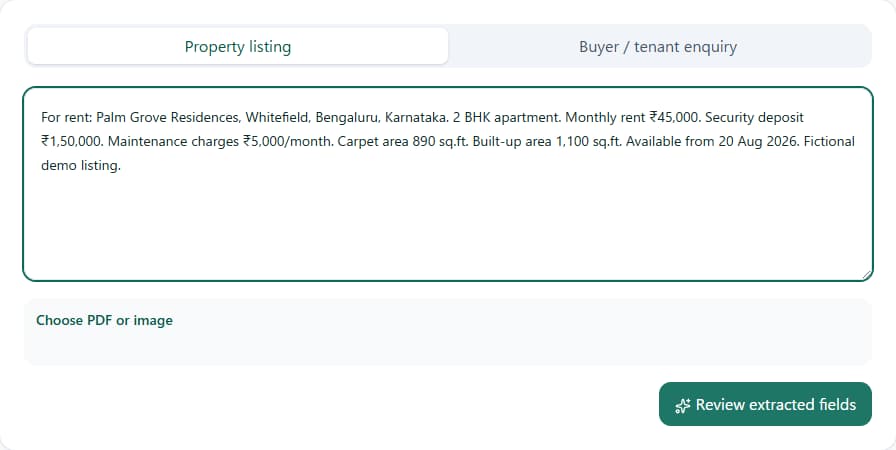
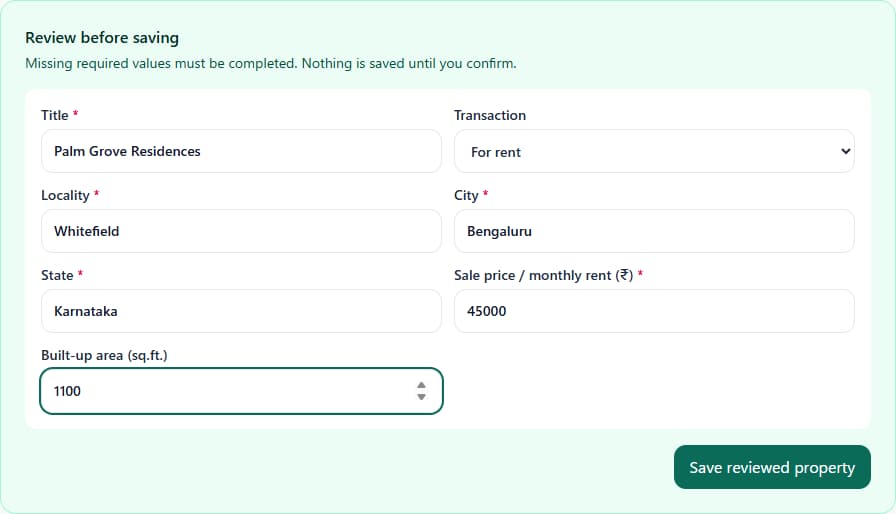
Paste resale or rental text, or choose a property PDF or image. Check the extracted fields before saving; manual entry is also available.
FOR RESIDENTIAL REAL ESTATE BROKERS, AGENTS AND PROPERTY CONSULTANTS IN INDIA
Paste resale or rental details. RakuMatch AI checks them against saved buyer or tenant requirements—added manually or imported from CSV—and builds a client shortlist with the recorded reasons behind each suggestion.
Card required · ₹0 subscription fee today · ₹1,799/month from day 8 · Cancel before the trial ends
A focused matching workspace—not another all-in-one CRM.
Current version: English UI · single-user workspace · no shared team collaboration
CURRENT INDIA APP WORKFLOW
These screenshots come from the working India app—not a concept mock-up. Fictional records show the path from a listing you are authorised to use to a WhatsApp draft that you review and send yourself.
PASTE, THEN CHECK THE FIELDS
Paste resale or rental text, or choose a property PDF or image. Check the extracted fields before saving; manual entry is also available.
OPEN THE CLIENT SHORTLIST
RakuMatch AI compares the listing with saved buyer or tenant criteria. Each suggestion shows the recorded conditions behind it, so you can decide whether to follow up.
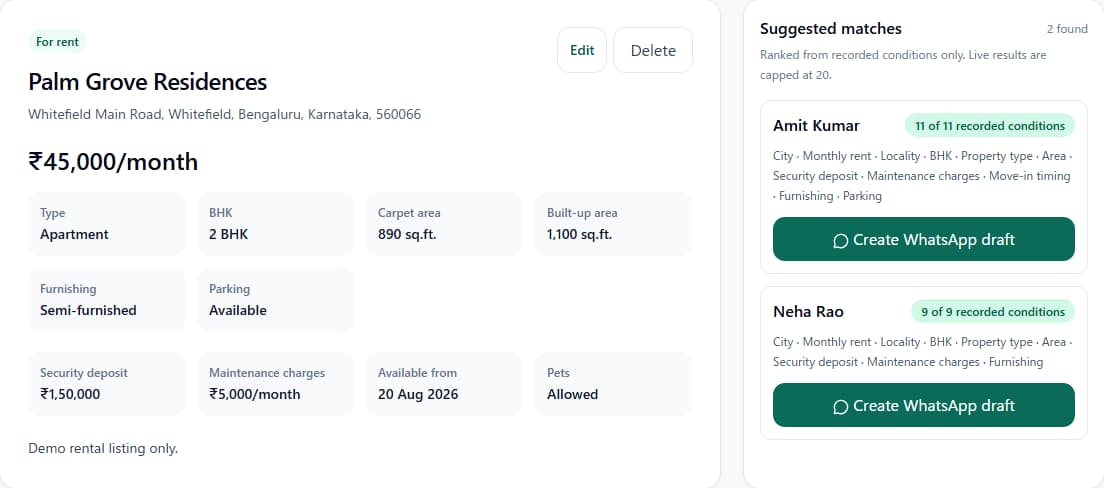
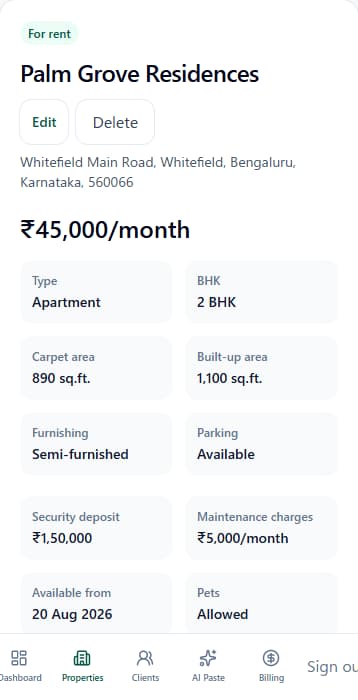
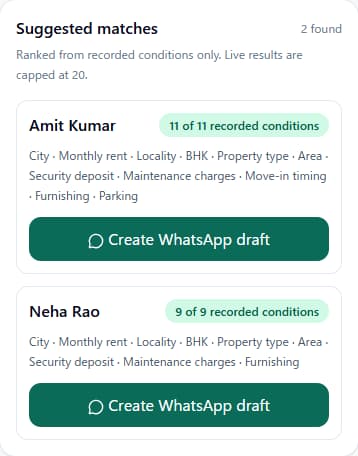
Why a client appears: the screen lists each matching condition saved on that requirement record.
Example not shortlisted: a saved maximum rent of ₹42,000 excludes this ₹45,000/month listing.
PREPARE THE FOLLOW-UP
Open a draft for one suggested client, adjust the wording, and confirm that the saved WhatsApp opt-in still covers the contact. The app copies the draft; it never sends the message.
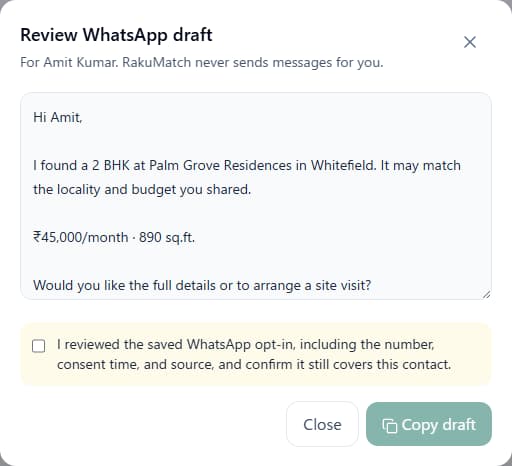
All screens use synthetic demo records. No real person, phone number, or property is represented.
DATA IN, BROKER IN CONTROL
RakuMatch AI stays focused on matching and follow-up. It does not source new leads or replace a full CRM.
Enter property and requirement records manually, import authorised CSV data, or paste listing text. Property PDFs and images are also supported.
Start from a listing to see matching clients, or from a buyer or tenant requirement to see suggested properties. Recorded criteria explain each result.
Edit and copy a WhatsApp draft after checking the saved opt-in. RakuMatch AI does not send messages automatically.
SIMPLE PRICING
Core tools for moving from a residential listing to a client shortlist and manual follow-up.
FAQ
Clear terms make it easier to see whether RakuMatch AI fits your workflow.
A card is required. The subscription fee is ₹0 today. If you do not cancel before the trial ends, the plan starts at ₹1,799 for one single-user workspace/month on day 8. After checkout, cancellation is managed from the secure billing portal.
RakuMatch AI is for residential real estate brokers, agents and property consultants in India who manage resale or rental listings and buyer or tenant requirements.
The current RakuMatch AI workspace is in English.
No. The current version is a single-user workspace and does not include shared team collaboration.
No. RakuMatch AI matches the property and buyer or tenant requirement records you add or import. It does not source new contacts.
Yes. You can keep residential resale and rental requirements separate and build a client shortlist for each property.
No. It prepares an editable draft based on the property and client record you select. You confirm the saved opt-in, copy the draft, and send it yourself.
Yes. The current version supports CSV import, pasted listing or enquiry text, property PDFs or images, and manual entry. Import only data you are authorised to use.
RakuMatch AI compares recorded property details with saved client criteria such as locality, BHK, purchase budget or monthly rent, area, furnishing, and availability. Results are suggestions, not guarantees.
RAKUMATCH AI
Add one resale or rental property, review the matching buyers or tenants, then choose who to follow up with.
Start your 7-day free trialCard required · ₹0 subscription fee today · ₹1,799 for one single-user workspace/month from day 8 · Cancel before the trial ends